Product Features

CyVIDRA
Technical Features

It gathers what a SIEM sees, what a SOAR does and what a SOC team thinks into a single mind. Yet it is none of them. Every CyVIDRA capability is a link in one chain — and you stand in the middle of it.

Product tour

See CyVIDRA at work

Explore the CyVIDRA interface in three minutes, from custom rules and event review to integrations and compliance reports.

3 min 9 sec · Turkish interface · Silent tour edited from real screenshots. English and Turkish descriptive subtitles are available in the player.

Download the video (MP4, about 45 MB)
Read the video summary
  1. CyVIDRA product and integration tour. A silent presentation edited from actual interface screenshots.
  2. All events: logon, account, system and application events, with severity and date views.
  3. USB and devices: USB insertion events, time, machine and severity filters.
  4. Alerts: critical and open cases; computer, severity, timeline and attacker views.
  5. Alert review: target, source and repetitions; investigation, closure and false-positive options.
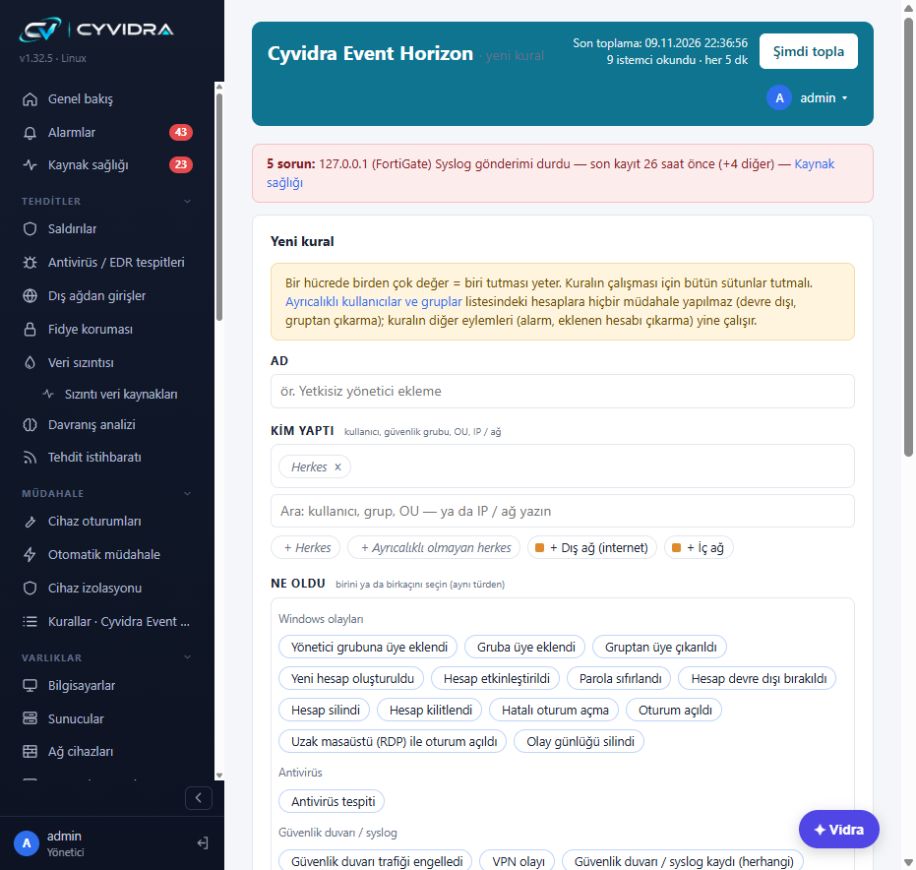
  6. Event Horizon: as many custom rules as you need, with user, group, OU, IP and network conditions.
  7. Rule details: time windows, exceptions and actions; simulation, approval-based or automatic execution.
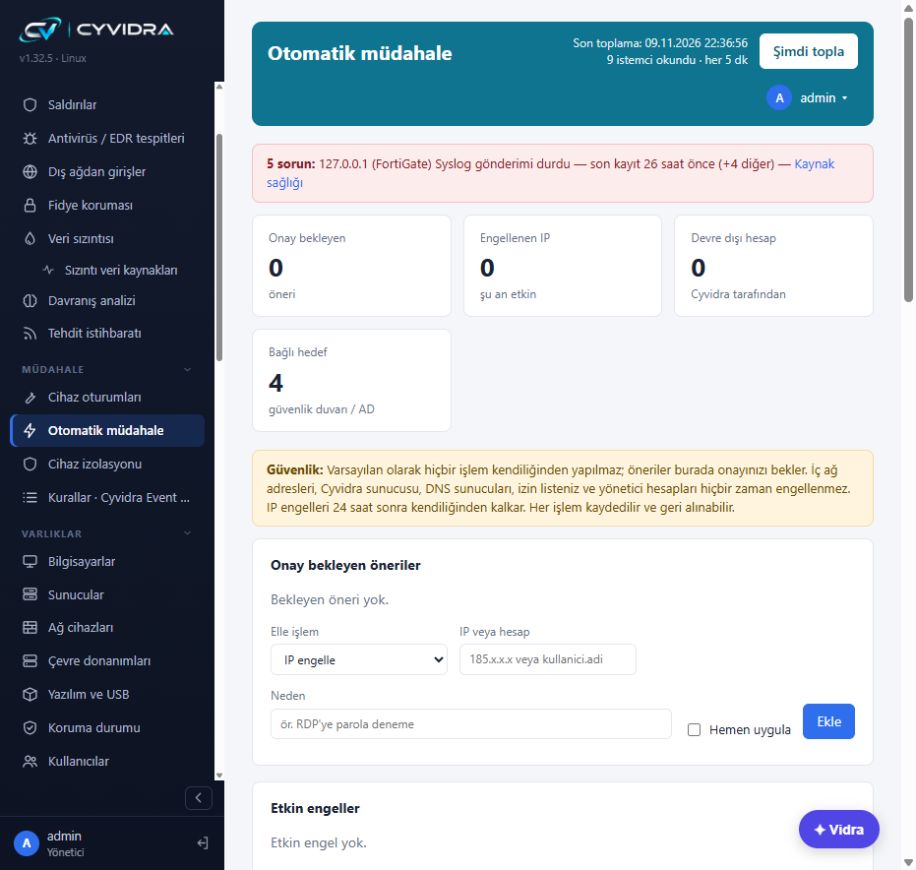
  8. Response: pending approvals, IP blocking, account disabling and action history.
  9. Hybrid response: per-scenario modes, timed IP blocks, action limits and protection lists.
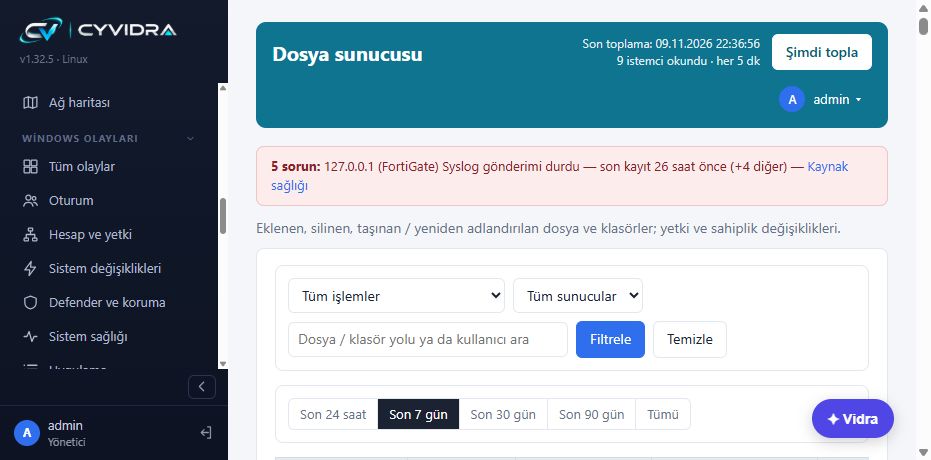
  10. File server: file paths and action details, including creation, writes, deletion, renaming and permissions.
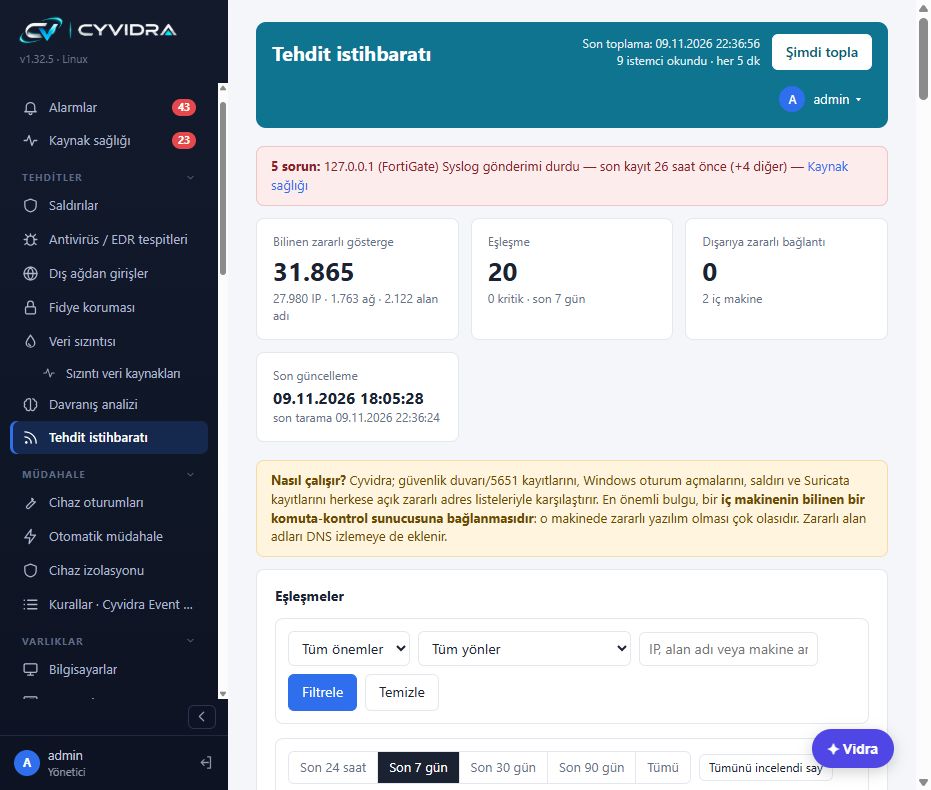
  11. Threat intelligence: matching IP, network and domain indicators against event records.
  12. Device connections: connected, discovered, problematic and log-sending devices; product, method and last data.
  13. Integration methods: WMI/WinRM, Agent, SNMP, SSH, VMware ESXi/vCenter and REST API.
  14. API connections: tokens, API keys, Basic and OAuth2. Some connectors require field validation.
  15. KVKK: technical controls, status, evidence, recommendations, and PDF or CSV exports.
  16. ISO/IEC 27001:2022: records mapped to technical controls. Reports do not replace an audit or certification.
  17. Cyber insurance: records support technical pre-assessment; acceptance of an application is not guaranteed.
  18. Collection settings: logon security, account changes, file permissions, ransomware indicators and backups.
  19. Receiver settings: Syslog UDP/TCP, SNMP traps, source allowlists and record counters.
  20. Alert settings: grouped rules, thresholds and severity options.
  21. CyVIDRA. The machine thinks. You have the final say. cyvidra.com.
CyVIDRA

Take a closer look at the product screens.

Your rules, file activity traces and response informed by context. Explore the CyVIDRA approach through real product screens.

CyVIDRA Event Horizon

As many rules as you need.
Defense logic of your own.

Define as many custom rules as your organization needs. Who acted, what happened, where did it happen, which exceptions apply and what should follow? Event Horizon brings these questions together in one rule.

  • Set conditions using a user, security group, OU, IP address or network.
  • Combine event types, occurrence counts and a time window.
  • Choose scenario-specific actions: alerts, email, disabling accounts, removing group members or blocking IP addresses.
  • Try a rule in simulation before choosing approval-based or automatic execution.
CyVIDRA Event Horizon custom rule editor with actor and event conditions
Actual product screen · Turkish interface · Select the image to enlarge.
File Server Monitoring

See the trace behind
a file change.

Review files and folders that were created, written, deleted, moved or renamed, alongside permission and ownership changes.

  • Filter activity by server, user or file path.
  • Use recorded events to investigate who changed which file or folder, and when.
  • Monitored folders and file system auditing are configured during setup.
CyVIDRA File Server screen with action, server and file path filters
Actual product screen · Turkish interface · Select the image to enlarge.
Threat Intelligence

Connect external intelligence
to traces on your network.

Match IP, network and domain indicators against firewall, Windows logon, attack and Suricata records. Evaluate inbound traffic and outbound connections in their respective contexts.

  • Review indicator type, traffic direction, source and severity together.
  • Add your own threat lists and internal sources alongside built-in feeds.
  • Connect malicious domain indicators with DNS monitoring.
CyVIDRA threat intelligence summary indicators and match filters
Actual product screen · Turkish interface · Select the image to enlarge.
Automatic and Hybrid Response

You decide where speed matters
and where approval is required.

Let selected scenarios run automatically while others wait for approval. Hybrid response combines automation and human decisions through a per-rule execution mode.

  • Choose simulation, approval-based or automatic execution for each scenario.
  • Manage IP blocking and account disabling through configured targets.
  • Define response boundaries with protection lists, action limits and time-limited IP blocks.
  • Review action history and reverse supported response actions.
CyVIDRA response screen with pending approvals and active blocks
Actual product screen · Turkish interface · Select the image to enlarge.

Screens show the interface at a point in time; counters do not represent capacity or detection performance claims. Organization, personal and file records are outside the frame.

01
Sees

Nothing on your network stays silent.

CyVIDRA collects the trace wherever it comes from: with or without an agent, pushed or pulled, even when the link drops.

Every device is a sentinel

Your inventory is not a vulnerability list. It is an early-warning network.

CyVIDRA listens not only to security products but to every device and application on the network: printers, IP phones, cameras, UPS units, switches, backup, hypervisors, business applications. Each one's normal is learned on its own. Traffic at an unusual hour, a destination seen for the first time, a newly opened port or an unexpected login enters correlation as an early sign of attack. Attackers usually leave a trace on an ordinary device before they ever reach a security product; CyVIDRA reads that trace and buys defense time.

Windows

Windows events, three ways

The lightweight CyVIDRA Agent, agentless remote reading, or Windows' own Event Forwarding (WEF). Logons, accounts, privileges, services, scheduled tasks, log clearing, USB — the right path is chosen per machine.

Network

Syslog, SNMP and live packets

UDP/TCP 514, CEF, SNMP v1–v3 traps. Vendors are recognized and record types parsed; even an unknown device is never lost.

Firewall

Traffic, VPN and IDS / IPS

FortiGate, pfSense / OPNsense and more: forwarded traffic, VPN sessions, attack signatures; Suricata records in their own tab.

Identity

Active Directory

Kerberos logons, account and group changes, lockouts, policy changes — the whole domain in one stream.

Network services

DNS, DHCP, ARP and MAC

Who got which address, asked for which domain, connected to which port. CyVIDRA can even run your DHCP and DNS server itself.

Virtualization

Hypervisors and servers

VMware ESXi / vCenter API: VM inventory, login attempts, lockdown mode, deleted or powered-off VMs. iDRAC / iLO hardware health.

Cloud

Microsoft 365

Sign-ins, mail rules, sharing and admin actions; the cloud trace joins the same chain as on-premises.

Endpoint

Antivirus and EDR

Detections and protection status from Defender, Kaspersky, ESET and others. Who is protected, who isn't, who has gone quiet — in a single number.

Inventory

Network map and inventory

Every device on the network is discovered and classified: client, server, network device, printer, camera. Hardware, installed software and USB history per machine. Multi-homed devices become one record.

Files

File servers and shares

Files and folders added, changed or deleted; permission and share changes — who, from which computer.

Loses nothing

Sensor with offline buffer

A branch sensor keeps logs in raw form. If the link drops it keeps collecting; when the link returns it delivers the backlog in order, sealed, to the center.

Watches itself

Source health

A device gone quiet, a stopped agent, a replaced antivirus, a rejected password — CyVIDRA notices its own blind spots and says so.
02
Understands

A trace gains meaning next to another.

CyVIDRA reads events together, not one by one. It filters the noise itself and finds the person behind an IP address.

People

Agentless identity layer

A person next to every IP in every log: name, department, manager. Domain logons, open sessions and directory data are combined — no extra agent, no extra product.

Chain

Who did what to whom — from which computer

When an account is added to an admin group: the person who did it, the session chain and the remote desktop source, in one line.

Silence

Self-correcting alert engine

Learns each source's normal quiet period; doesn't mistake an antivirus swap for "service stopped"; treats an outage as one case and closes it when it's over. When unsure, it asks once.

Leakage

Cross-source data leak detection

Takes volume from the machine and destination from the network; never trusts a single source. Joins uploads split into pieces into one finding; counts only data leaving to the internet as leakage.

Blind spot

Catches what devices miss

If the firewall under-counts bytes, CyVIDRA notices, says so — and still catches the leak from session patterns.

Ransomware

Ransomware behavior

Shadow copy deletion, backup and security services being stopped, mass file changes and decoy files being touched — as one chain, within minutes.

Behavior

Unusual behavior

An account reaching a machine it never touched, a logon at an odd hour, a session from a new country. Each person's normal is learned; the deviation is explained.

Noise

"That was me"

Update, system-account and scan noise is filtered. People confirm their own actions; the same person, action and source never alerts again.

Tampering

Observation mode

When a security service stops, CyVIDRA watches for 30 minutes: update or tampering? It tells them apart and opens a case with its state.

Intelligence

Threat intelligence and location

Known malicious addresses; the country where an address is used next to the organization it's registered to — and what the difference means.

Vulnerability

Vulnerabilities from inventory

Installed software is matched with known vulnerabilities; those actively exploited right now come first. No extra scanner. The externally visible attack surface is tracked as well.

Audit

AD and firewall audit

A security score and findings for your domain; overly permissive firewall rules. Every finding with why it matters and how to fix it.

03
Prepares · Vidra

It explains what happened and prepares what to do.

Vidra is CyVIDRA's AI advisor. It knows, prepares and asks. It doesn't command.

Evidence-based

Every claim is backed by a record

Everything Vidra says links to a record in CyVIDRA; any inference without a source is marked as an assumption.

Masked

Internal data stays inside

User names, internal addresses, passwords and personal data are masked before anything reaches the AI. You see in advance what will be sent.

Vidra · Diagnose

Until the problem is solved

Describe → diagnose → investigate → evaluate → resolve → verify. It already knows your environment, so it doesn't ask for versions; it moves one right step at a time. An unverified fix is never called solved.

Device language

Vendor-aware commands

The same block is written one way on FortiGate and another on pfSense. Vidra prepares the command in your device's language, with impact and undo path alongside.

Plain words

Tells the event as a story

Three sentences instead of a hundred log lines: what happened, who did it, what is recommended. Ask by selecting a row in any table.

Memory

Never forgets a fix

Every verified fix joins the knowledge base with your approval. When the same problem returns, Vidra knows where to start.

04
Asks you

You stand in the middle of the chain.

CyVIDRA never responds by going around you. You decide when it asks, whom it asks, and what it must never do.

One click

Approval next to the alert

From the panel or your phone: the prepared action, its impact and its undo path on one screen. Approve or hold.

Four eyes

Second approval for critical actions

Critical actions such as disabling an account or mass blocking wait for a second person's approval — by e-mail or a senior manager.

Simulation

"What would it have done?"

CyVIDRA first runs in the shadow: it shows what it would block without touching real traffic. You mark the mistakes, the rules correct themselves; you switch it on once you trust it.

Event Horizon

Any rule you can imagine

With the CyVIDRA Event Horizon rule set, everything the product does can be expressed as a rule: every source, every field, every action. No event escapes your rules.

Learning template

Your organization's habits

During simulation, habits like "the backup server sends a lot of data at 2 a.m." are learned in an explainable way and become a template of your own.

Boundaries

Protection lists and exceptions

Management addresses, critical servers and accounts are never blocked. One-click exceptions for low risk; for confirmed malicious activity, exceptions only with approval.

05
Acts

Your decision. CyVIDRA's speed.

No consoles to open, no VPN to set up, no commands to remember. CyVIDRA applies, verifies the result and records every step.

Block

IP block on the firewall

Timed or permanent; an expired block lifts itself. Addresses on the protection list are never blocked.

Disable

Active Directory account

Disable a compromised account in seconds; re-enable it with one click once it's over.

Isolate

Take a machine off the network

A suspicious machine is isolated so it can talk only to CyVIDRA; investigation continues, spread stops.

Your antivirus

Your antivirus becomes a response tool

Without installing a new agent, scan, quarantine and isolate through the console of the antivirus you already own. Your investment keeps working.

Built-in protection

Defender management and YARA

On machines without antivirus, Windows' own Defender is managed from CyVIDRA, plus targeted YARA rules against ransomware and attack tools.

Direct

PowerShell and SSH from the panel

Connect to servers, network devices and Linux machines from the panel. Passwords stay in the vault, no one sees them; every session and every command is recorded.

06
Remembers

Loses nothing. Proves everything.

Live screens show only what is happening now; everything else is kept calmly and completely.

Tamper-evident

Sealed records

Daily digests are sealed in a chain; you can verify that no record was changed or deleted afterwards. Retention follows the law (Turkish Law 5651).

Archive

Clean screens, complete record

Every event that resolved itself, was closed, was marked false positive or counted as noise moves to a categorized archive. The detection engine keeps seeing the archive.

Compliance

Control → evidence

For KVKK, ISO 27001 Annex A and cyber-insurance audits, the evidence for each control on one screen; exportable as a report.

Audit trail

Who approved what, and when

Every approval, every response, every setting change — in a tamper-evident audit trail.

Report

A summary for management

Weekly and monthly summaries: what happened, what was done, what is pending. Plain language for non-technical readers.

Backup

Configuration backup

Settings, rules, credentials and history in one file; restore to the same machine or a new installation.

Our difference

Same questions, different answers.

More alerts are produced; filtering them is left to the analyst.
CyVIDRA filters the noise itself; when unsure it asks once, and never again.
You see an IP address in a log.
You see the person behind it: name, department, which computer — without an agent.
Automation is either missing or blind.
The machine prepares, you approve; you build trust in simulation first.
AI gives an answer; how it knows is unclear.
Vidra links every claim to a record and masks your internal data before anything leaves.
When a source goes quiet, no one notices; the blind spot stays hidden.
CyVIDRA notices its own blind spots and says so.
Every need means a new product, a new agent, a new license.
Your existing antivirus, firewall and Windows' own capabilities become response power.
If the link drops, logs are lost.
The sensor buffers offline and delivers the backlog, sealed, when the link returns.
Every device is a liability to protect.
Every device is a sentinel that warns you early.
Another screen for every task.
One chain, one panel — from seeing to proving.
Platform

Light to install, built to defend itself.

CyVIDRA runs on its own hardened Linux base. One virtual machine, one command, a few minutes.

Install

One command

Installs on a virtual machine; set the IP from the console menu and finish the first-run wizard in your browser.

Update

One click, instant rollback

Update from the panel, or upload a file in offline environments. A backup is taken first; if anything goes wrong, you are back on the previous version in seconds.

Self-protection

Closed by design

The service runs as an unprivileged user; IPS on traffic to the appliance itself, login-attempt blocking, application confinement and file integrity checks. Security updates are automatic.

Vault

Passwords encrypted, never shown

Connection passwords and keys in an AES-256-GCM vault; which account is used on which machine for what, at a glance. A rejected password is stopped before it can lock your account.

Access

Two-factor and roles

Administrator, analyst and read-only roles; two-factor login; automatic certificates for the internal panel without opening a port.

Scale

Center, sensor, MSP

From one installation to many branches: sensors in the field, one panel at the center, outbound-only connections. Separate customer spaces for service providers.

Network interface roles

Each network card gets a role; firewall rules are generated from the roles. A wrong change is rolled back unless confirmed within 60 seconds.

ManagementPanel and console only from here.
LANInternal network; collection and response.
DMZCan reach the internet, not the LAN.
WANThe outside world.
MirrorListens to switch-mirrored traffic only.
UnusedNot in use.

Integrations

Windows (Agent · WEF · remote)Active DirectoryMicrosoft 365FortiGatepfSense / OPNsenseSuricataVMware ESXi / vCenteriDRAC / iLOMicrosoft DefenderKasperskyESETSyslog / CEFSNMP v1 · v2c · v3SSHPowerShell / WinRMREST API (token · OAuth2 · Basic)

System requirements

DeploymentVirtual machine (VMware, Hyper-V, Proxmox, KVM) or physical server
Starting size2 vCPU · 4 GB RAM · 40 GB disk (scales with your environment)
DatabaseEmbedded PostgreSQL; no extra license
NetworkSyslog 514 UDP/TCP · SNMP trap 162 · panel over HTTPS
LanguagesTürkçe · English
SensorLightweight sensor per branch; outbound-only encrypted link to the center
Common questions

Frequently asked questions

How many Event Horizon rules can I define?

You can define as many custom rules as you need, combining events, user or network conditions, exceptions and actions for your scenarios.

Can I try a rule before enabling it?

Yes. Simulation records results without applying actions. The rule editor also offers a query to see how often the rule would have matched over the last 30 days.

What does hybrid response mean?

It means running selected rules automatically and others with human approval. Per-rule modes operate within the limits allowed by the overall execution mode.

Which file server activities can be monitored?

File and folder creation, writes, deletion, moves or renaming, and permission and ownership changes can be monitored. Auditing and monitored folders must be configured on the relevant server.

Can I use my own threat intelligence sources?

Yes. Custom IP, network and domain lists and internal intelligence sources can be configured alongside built-in feeds. Access and usage conditions for external feeds depend on the provider.

Next step

Technical details only go so far.
See the rest on your own network.

Request a demo
For our philosophy → Manifesto